Winter sowing2026/2027 season

Fields, tasks and AI.
In a single app.

Import your declared fields, plan the 2026/2027 season and ask an AI that answers from your own farm data.

iPhone version coming soon

  • Declared field import
  • 660 crop protection products
  • Weather per field

Want to help improve the app?Become a beta tester

Field map showing farm boundaries and areas

Open testing is running: every feature is free, and your feedback decides what gets built next.

Get it on Google Play

This is how it looks on the phone

The three screens farmers open most. Every image comes from the real app.

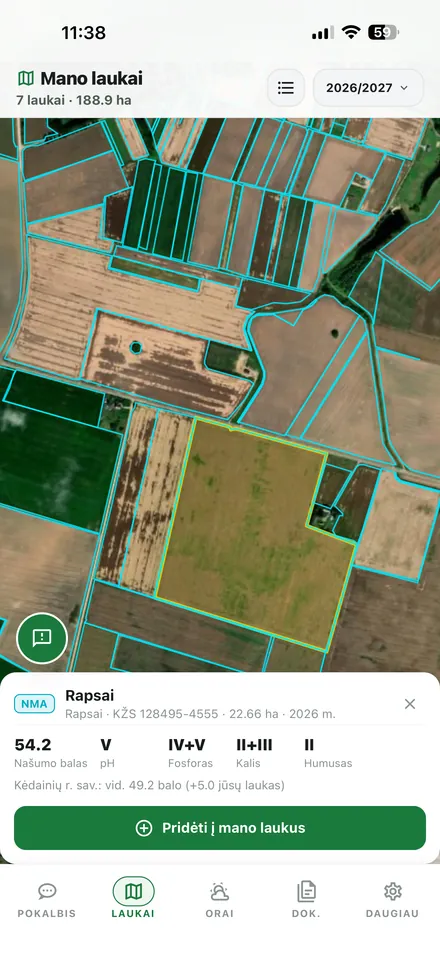
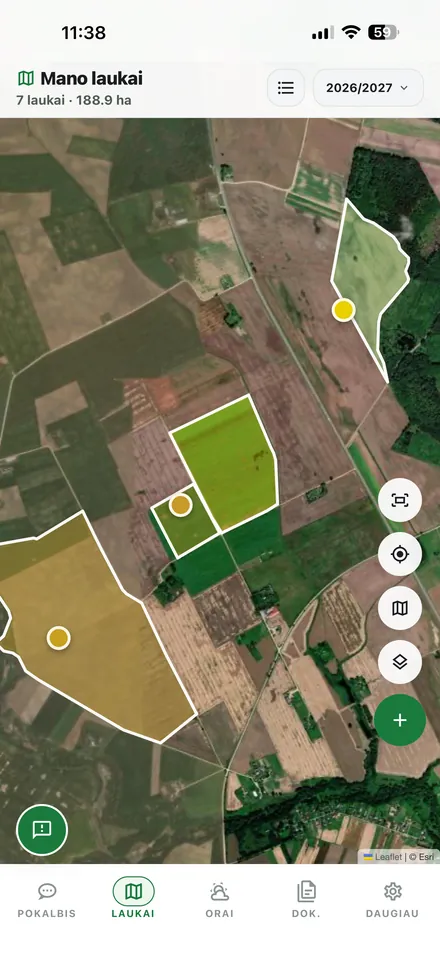
Every field, with official soil data

Import your declared fields or draw the boundaries yourself. Tap a field and you immediately see the crop, the area in hectares and the soil survey figures.

  • Declared field import from the paying agency
  • Soil: pH, phosphorus, potassium, humus
  • Areas calculated automatically
Field card with official soil indicators

An AI that does the maths on your farm

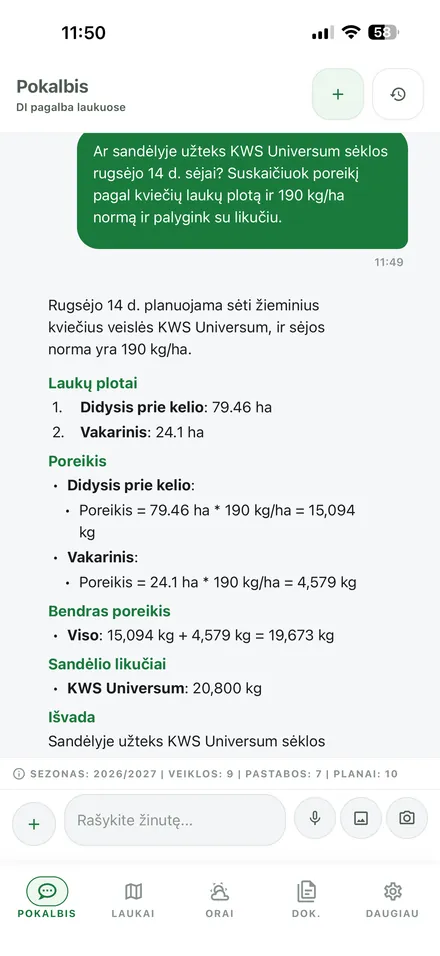
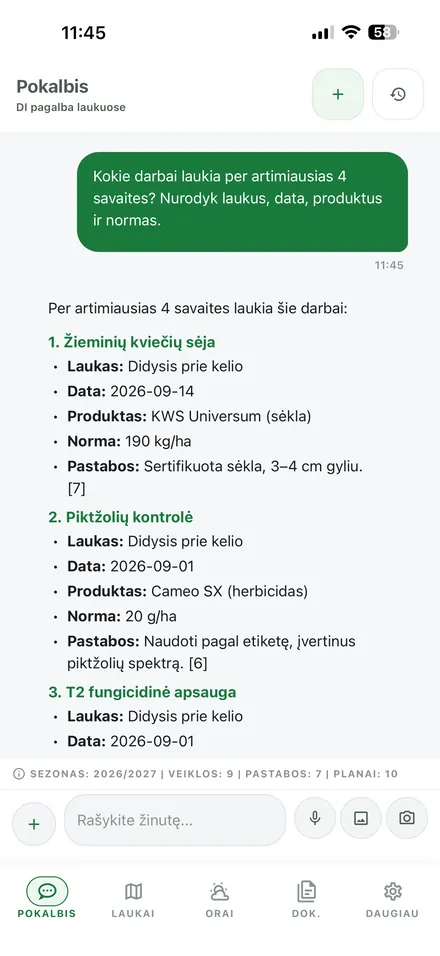
Ask in plain language. The assistant takes your field areas, the season plan and current stock levels, then shows the whole calculation step by step.

  • Answers in Lithuanian, without jargon
  • Grounded in your fields, plans and documents
  • Shows where every number came from
AI assistant calculating whether stock covers the sowing plan

Season work and stock in one place

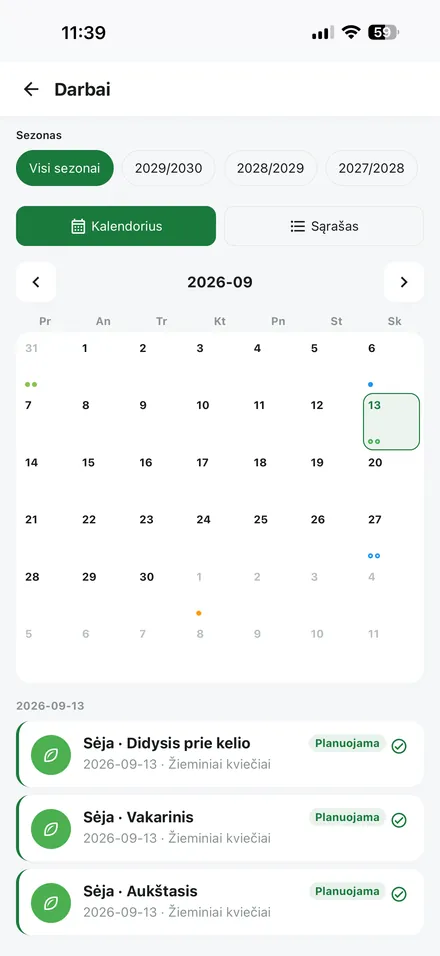
The calendar shows what is planned and what is already done. The store tracks fertiliser, crop protection and seed levels, so AI answers rest on real quantities.

  • Sowing, fertilising and spraying with rates
  • Stock levels per store and per batch
  • 660 crop protection products with registration data
Work calendar with planned sowing activities

Everything the Modern Farm Needs

From an AI agronomist to a 660 product crop protection registry. Every feature is built with farmers, to save time and support better decisions.

AI Assistant

Ask about crop protection, fertiliser rates, spraying schedules or any farm decision, in Lithuanian. The assistant draws on your field data, season plans, activities, notes and uploaded documents, and shows how many sources went into each answer. Type, speak or send a photo.

Field Map with Official Data

Import declared fields by cadastral number, upload a SHP or GeoJSON file, or draw the boundaries yourself on a satellite map. Tap a field to see the crop, the area in hectares and soil survey figures: productivity score, pH, phosphorus, potassium and humus, compared against the district average. All fields can be carried into a new season in one step.

AI Agrotechnics Wizard

Enter the crop, soil analysis, budget, previous rotation and target yield, and the AI generates a complete annual agrotechnics plan with all operations, products, rates and dates. The plan can be saved and applied to other fields.

Weather for Every Field

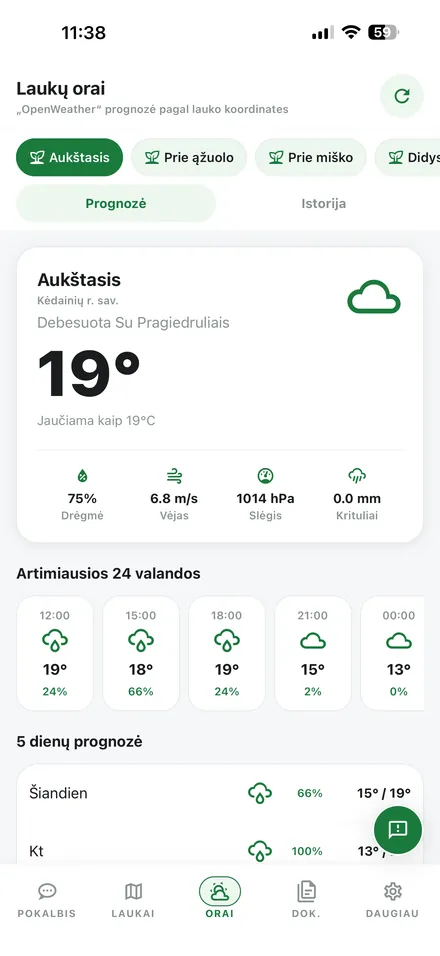
The forecast is calculated from each field's own coordinates, not from the nearest town. See current conditions, the next 24 hours and a five day outlook with humidity, wind, pressure and rainfall, plus a history view of what the weather actually did last season.

Field Notes with Weather

Record observations by voice and the AI transcribes the audio to text. Each note is enriched with the weather at that moment, based on the field's GPS position. Notes are indexed and become available to the AI assistant.

Document Storage

Upload PDF, DOCX or XLSX files or paste a web link, and the system extracts and indexes the content. All documents become available to the AI assistant, so answers draw on your own agronomic sheets, supplier instructions and contracts.

Work: Calendar and Log

One screen holds both the monthly calendar with colour coded status markers and the full activity list per season. Record sowing, fertilising, spraying and mechanical work with products, rates, machinery and staff. Actions the AI proposes are approved or rejected with a single tap.

Farm Inventory

Fertiliser, crop protection and seed stock across several stores, with zones and batch numbers. A new entry can be dictated in plain text through the "enter with AI" button, and purchases, usage, returns and write-offs stay in the history. The AI assistant sees the same stock, so it calculates against real quantities.

Product Registry and Catalogues

The app already ships 660 crop protection products with manufacturers and filters by type: herbicides, fungicides, insecticides and more. Each one carries official registration data: permitted crops, doses, pre-harvest intervals and restrictions. Alongside it you keep your own fertiliser and seed catalogue.

Employee Management

Add employees with positions, contact details and a colour code for identification in the calendar. You can create a separate app account with an assigned role, from observer to administrator.

Equipment Tracking

Register tractors, combines, sprayers, seeders and other agricultural machinery with makes, models and registration numbers. Each machine is assigned to activities, so you know what worked where and when.

Get Started in 3 Minutes

01

Register

Create your account and add your farm. No technical knowledge needed, just your phone and a few minutes.

02

Add Fields

Import your declared fields by cadastral number, upload a SHP or GeoJSON file, or draw the boundaries by hand on the map.

03

Work Smarter

Ask the AI assistant, plan the season, track stock levels and keep every document in one place.

✓
Account created
✓
Farm added
○
Fields markedNow
○
First AI answer
Setup50%

The People Behind AgroLITix

A small team, a big idea: building the best farm management app for Lithuania.

Tadas Arlauskas

Tadas Arlauskas

Developer · AI Solutions

Specialises in AI solution development. Builds AgroLITix intelligent features, from machine learning models to real-time recommendations that help farmers make data-driven decisions.

Tomas Jonikas

Tomas Jonikas

Developer · Systems Engineer

Responsible for AgroLITix system architecture and AI component integration. Ensures the platform runs fast and reliably regardless of load.

Gvidas Garadauskas

Gvidas Garadauskas

Developer · Agriculture Domain Expert

A developer raised in a farming environment. Combines domain expertise and programming skills to build features that accurately reflect the real-world needs of farmers.

Deividas Jackis

Deividas Jackis

Developer · Marketing & Business Growth

Developer and marketing management graduate student raised on a farm and applying technology solutions in practice. Responsible for AgroLITix brand awareness, partnerships and e-commerce strategy, bridging farm experience with business and technology.
Interested in joining the team or collaborating?Write to us →

Frequently Asked Questions

Can't find an answer? Write to us at info@agrolitix.lt, we reply within 24 hours.

Start Managing Your Farm Smarter

Join the farmers testing AgroLITix, whose feedback decides what gets built next.

Every feature free · No credit card required · Data on EU servers